
The Polaris Marketplace
Shop business technology, your way.
Explore, compare and save options. Most categories need no address; internet services are checked by an advisor.
All solutions · 30 options
30 options shown
Connectivity & Networking
Dedicated fiber
A private, symmetrical connection reserved for your business.
Best for: Offices that rely on cloud apps, video or large uploads
Address check required- What it does
- A private, symmetrical connection reserved for your business.
- Who it's for
- Offices that rely on cloud apps, video or large uploads. Heavy uploads, cloud apps or video all day.
- Considerations
- Installation can take longer where construction is needed.
Learn more about Connectivity & NetworkingConnectivity & Networking
Broadband with backup
A shared business connection paired with a second link that takes over if it drops.
Best for: Smaller sites that can't afford to go offline
Address check required- What it does
- A shared business connection paired with a second link that takes over if it drops.
- Who it's for
- Smaller sites that can't afford to go offline. Outages hurt, but budgets matter.
- Considerations
- Shared connections can slow at peak times.
Learn more about Connectivity & NetworkingConnectivity & Networking
SD-WAN
Software that manages several connections and sites as one network.
Best for: Businesses with several locations or connections
Address check required- What it does
- Software that manages several connections and sites as one network.
- Who it's for
- Businesses with several locations or connections. Multiple locations or several connections to balance.
- Considerations
- Adds a management layer that someone needs to own.
Learn more about Connectivity & NetworkingVoice & Collaboration
Cloud phone system
Business calling delivered over the internet to desk phones, computers and mobiles.
Best for: Teams replacing an older phone system or working remotely
No address needed- What it does
- Business calling delivered over the internet to desk phones, computers and mobiles.
- Who it's for
- Teams replacing an older phone system or working remotely. Replacing an aging on-site system or supporting remote staff.
- Considerations
- Call quality depends on a reliable internet connection.
Learn more about Voice & CollaborationVoice & Collaboration
Calling inside collaboration tools
Phone numbers added to the chat and meeting tools your team already uses.
Best for: Teams already working in one chat and meeting app
No address needed- What it does
- Phone numbers added to the chat and meeting tools your team already uses.
- Who it's for
- Teams already working in one chat and meeting app. Your team already lives in one collaboration platform.
- Considerations
- Advanced call-center features may need add-ons.
Learn more about Voice & CollaborationVoice & Collaboration
Contact center platform
Queues, routing and reporting for teams that handle many customer calls.
Best for: Sales or service teams handling many customer calls
No address needed- What it does
- Queues, routing and reporting for teams that handle many customer calls.
- Who it's for
- Sales or service teams handling many customer calls. Customer service or sales teams handle high call volume.
- Considerations
- More setup and training than a basic phone system.
Learn more about Voice & CollaborationMobility
Business mobile plans
Pooled lines and devices managed under one business account.
Best for: Staff who work on the move
No address needed- What it does
- Pooled lines and devices managed under one business account.
- Who it's for
- Staff who work on the move. Several staff rely on company phones.
- Considerations
- Coverage varies by area and should be checked where you work.
Mobility
Device management
Central control to set up, secure and wipe company devices.
Best for: Businesses issuing phones or tablets to staff
No address needed- What it does
- Central control to set up, secure and wipe company devices.
- Who it's for
- Businesses issuing phones or tablets to staff. Phones or tablets hold business data.
- Considerations
- Staff may need clear policies for personal devices.
Mobility
Wireless backup and IoT
Cellular connections for failover, vehicles or connected equipment.
Best for: Vehicles, kiosks, sensors and remote equipment
No address needed- What it does
- Cellular connections for failover, vehicles or connected equipment.
- Who it's for
- Vehicles, kiosks, sensors and remote equipment. You need connectivity where wired service isn't practical.
- Considerations
- Data usage needs monitoring to avoid surprises.
Cybersecurity
Endpoint and email protection
Defends computers and inboxes against malware and phishing.
Best for: Every business with computers and email
No address needed- What it does
- Defends computers and inboxes against malware and phishing.
- Who it's for
- Every business with computers and email. Every business with email and laptops.
- Considerations
- Works best alongside staff awareness training.
Learn more about CybersecurityCybersecurity
Managed detection and response
A team watches for threats and responds around the clock.
Best for: Businesses without staff to watch for threats around the clock
No address needed- What it does
- A team watches for threats and responds around the clock.
- Who it's for
- Businesses without staff to watch for threats around the clock. No in-house security staff, or sensitive data to protect.
- Considerations
- An ongoing service rather than a one-time purchase.
Learn more about CybersecurityCybersecurity
Secure remote access
Controls who can reach your systems from outside the office.
Best for: Teams working from home or on the road
No address needed- What it does
- Controls who can reach your systems from outside the office.
- Who it's for
- Teams working from home or on the road. Remote or hybrid staff and cloud apps.
- Considerations
- Requires keeping user access lists current.
Learn more about CybersecurityCloud & Infrastructure
Public cloud
Run systems and storage on large shared cloud platforms.
Best for: Businesses moving off an office server
No address needed- What it does
- Run systems and storage on large shared cloud platforms.
- Who it's for
- Businesses moving off an office server. You want to scale up or down without owning hardware.
- Considerations
- Costs need monitoring as usage grows.
Learn more about Cloud & InfrastructureCloud & Infrastructure
Hosted private environment
Dedicated infrastructure run for you in a data center.
Best for: Businesses with specialised or regulated systems
No address needed- What it does
- Dedicated infrastructure run for you in a data center.
- Who it's for
- Businesses with specialised or regulated systems. Specific performance, control or compliance needs.
- Considerations
- Less flexible to scale than public cloud.
Learn more about Cloud & InfrastructureCloud & Infrastructure
Backup and disaster recovery
Copies of your data and systems ready to restore after an incident.
Best for: Any business that can't lose its data
No address needed- What it does
- Copies of your data and systems ready to restore after an incident.
- Who it's for
- Any business that can't lose its data. Downtime or data loss would seriously hurt the business.
- Considerations
- Recovery should be tested, not just configured.
Learn more about Cloud & InfrastructureAI & Digital Transformation
AI built into existing tools
Turn on AI features in software you already use.
Best for: Teams wanting AI help in software they already use
No address needed- What it does
- Turn on AI features in software you already use.
- Who it's for
- Teams wanting AI help in software they already use. You want quick wins with little change.
- Considerations
- Check how each tool handles your data.
Learn more about AI & Digital TransformationAI & Digital Transformation
Workflow automation
Connect systems so repetitive tasks run on their own.
Best for: Businesses with repetitive manual tasks
No address needed- What it does
- Connect systems so repetitive tasks run on their own.
- Who it's for
- Businesses with repetitive manual tasks. Staff re-enter the same information in several places.
- Considerations
- Processes should be clear before automating them.
Learn more about AI & Digital TransformationAI & Digital Transformation
Customer-facing AI
AI assistants for chat, calls or scheduling.
Best for: Businesses answering the same customer questions often
No address needed- What it does
- AI assistants for chat, calls or scheduling.
- Who it's for
- Businesses answering the same customer questions often. High volumes of routine customer questions.
- Considerations
- Needs a clear handoff to a person for complex cases.
Learn more about AI & Digital TransformationNetworking Equipment
Cloud-managed Wi-Fi
Access points you set up and monitor from one online dashboard.
Best for: Offices, shops or venues with patchy or busy Wi-Fi
No address needed- What it does
- Access points you set up and monitor from one online dashboard.
- Who it's for
- Offices, shops or venues with patchy or busy Wi-Fi. Patchy Wi-Fi, more devices, or several sites to manage.
- Considerations
- Most cloud-managed gear needs an ongoing license.
Learn more about Networking EquipmentNetworking Equipment
Managed switches
Wired network hardware that connects computers, phones and printers.
Best for: Offices adding desks, desk phones or cameras
No address needed- What it does
- Wired network hardware that connects computers, phones and printers.
- Who it's for
- Offices adding desks, desk phones or cameras. Adding desks, desk phones or cameras.
- Considerations
- Phones and cameras may need powered ports.
Learn more about Networking EquipmentNetworking Equipment
Next-generation firewall
A security appliance at the edge of your network that filters traffic.
Best for: Any office network with remote connections
No address needed- What it does
- A security appliance at the edge of your network that filters traffic.
- Who it's for
- Any office network with remote connections. Protecting an office network and remote connections.
- Considerations
- Needs regular updates and someone to review alerts.
Learn more about Networking EquipmentManaged Services
Managed IT support
An outside team handles day-to-day IT, updates and user help.
Best for: Businesses without in-house IT staff
No address needed- What it does
- An outside team handles day-to-day IT, updates and user help.
- Who it's for
- Businesses without in-house IT staff. No in-house IT staff, or a stretched one-person team.
- Considerations
- Check response commitments and what counts as extra work.
Managed Services
Managed network services
A provider monitors and maintains your network equipment and connections.
Best for: Businesses where network downtime is costly
No address needed- What it does
- A provider monitors and maintains your network equipment and connections.
- Who it's for
- Businesses where network downtime is costly. Downtime is costly and nobody watches the network.
- Considerations
- You may be tied to the provider's preferred hardware.
Managed Services
Co-managed IT
Outside specialists work alongside your existing IT staff.
Best for: Businesses with a small IT team needing extra help
No address needed- What it does
- Outside specialists work alongside your existing IT staff.
- Who it's for
- Businesses with a small IT team needing extra help. Your team needs extra depth or after-hours cover.
- Considerations
- Roles and responsibilities should be written down.
Wireless Backup & Continuity
Wireless backup internet
A cellular connection that can take over when your main internet drops.
Best for: Shops, restaurants and offices that need to stay online
Address check required- What it does
- A cellular connection that can take over when your main internet drops.
- Who it's for
- Shops, restaurants and offices that need to stay online. Payments, phones or orders stop when the internet goes down.
- Considerations
- Coverage and failover behavior depend on location and configuration.
Learn more about Wireless Backup & ContinuityWireless Backup & Continuity
Second wired connection
A separate line from a different network for redundancy.
Best for: Sites where an outage stops the business
Address check required- What it does
- A separate line from a different network for redundancy.
- Who it's for
- Sites where an outage stops the business. You need more capacity than cellular backup offers.
- Considerations
- Both lines should use different paths into the building where possible.
Learn more about Wireless Backup & ContinuityWireless Backup & Continuity
Continuity planning
A written plan for what keeps working, and how, during an outage.
Best for: Any business wanting a plan for outages
Address check required- What it does
- A written plan for what keeps working, and how, during an outage.
- Who it's for
- Any business wanting a plan for outages. An outage would stop sales, care or operations.
- Considerations
- Plans should be tested, not just written down.
Learn more about Wireless Backup & ContinuityPhysical Security
Cloud video surveillance
Cameras with footage viewable and stored online.
Best for: Owners who want to check on sites remotely
No address needed- What it does
- Cameras with footage viewable and stored online.
- Who it's for
- Owners who want to check on sites remotely. You want to check sites remotely or review incidents.
- Considerations
- Upload capacity and storage retention need planning.
Physical Security
Access control
Badges, codes or phones control who can open which doors.
Best for: Sites where keys are hard to track
No address needed- What it does
- Badges, codes or phones control who can open which doors.
- Who it's for
- Sites where keys are hard to track. Keys are hard to track or staff change often.
- Considerations
- Doors may need wiring or new hardware.
Physical Security
Monitored alarms
Intrusion and environmental alarms watched by a monitoring team.
Best for: Sites that are unattended after hours
No address needed- What it does
- Intrusion and environmental alarms watched by a monitoring team.
- Who it's for
- Sites that are unattended after hours. Sites are unattended after hours.
- Considerations
- Local rules on alarm response can apply.
Product spotlights
Examples of products in these categories. Not offers, and nothing is reserved for you.
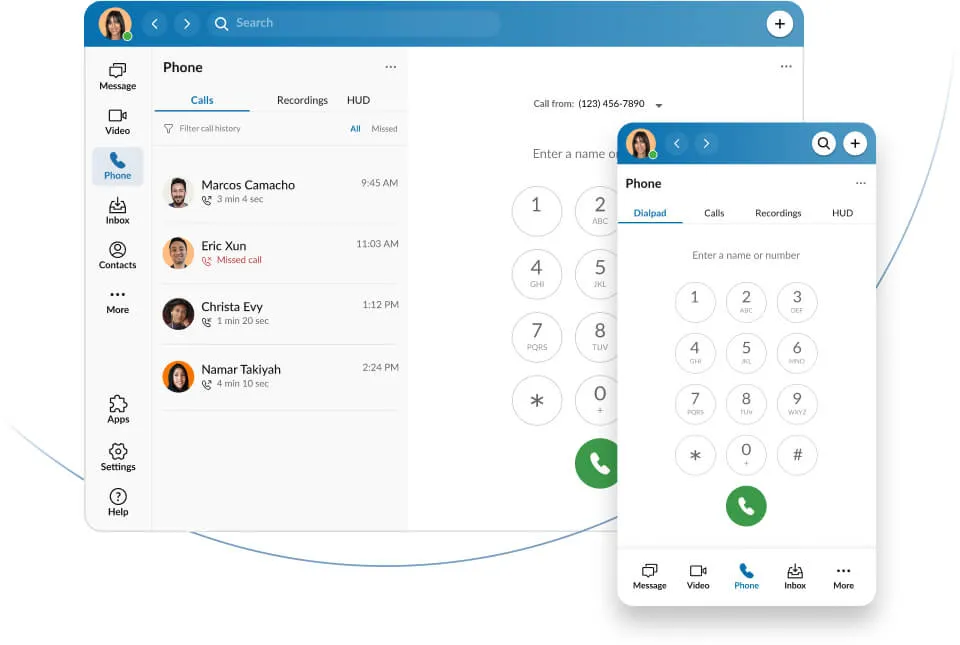
RingCentral
Cloud phone app on every device
An example of a cloud phone system: calling, messaging and meetings in one app.

Cisco Meraki
Cloud-managed Wi-Fi access point
An example of cloud-managed Wi-Fi, set up and monitored from one dashboard.
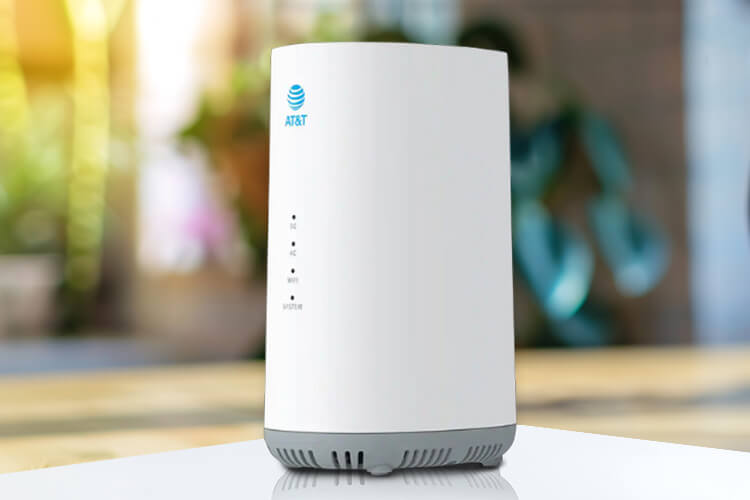
AT&T
Wireless backup internet gateway
An example of backup internet hardware. Availability and failover depend on location and configuration.
Product images and logos are authentic supplier imagery shown for identification only and imply no partnership or endorsement. Availability, eligibility, equipment and configuration must be confirmed with providers.
Want help choosing? It's optional.
Polaris Intelligence can suggest a preliminary plan from a short conversation, or keep browsing on your own.
Provider options vary by location and are confirmed during your advisor consultation. Polaris never assumes availability or pricing.